1. 기존 drag system의 문제점
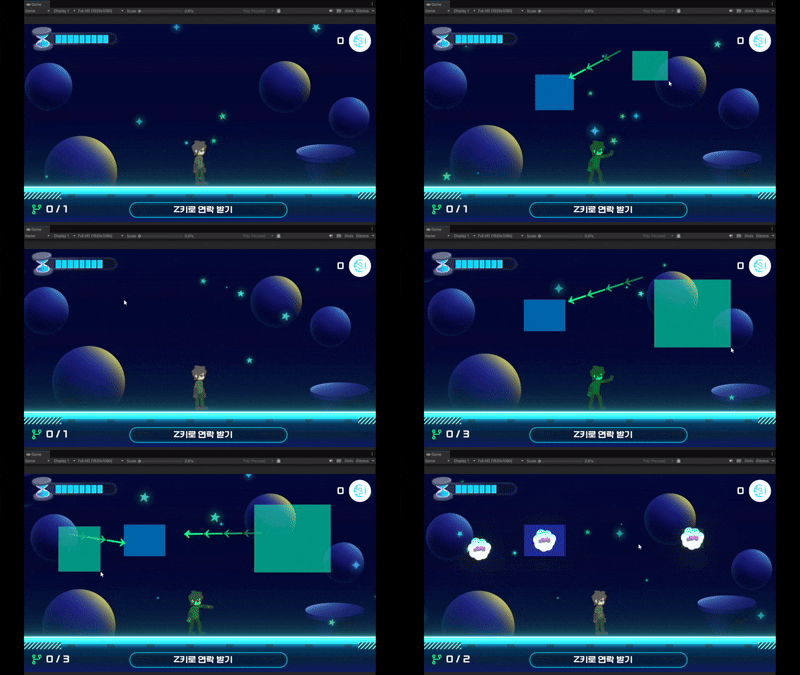
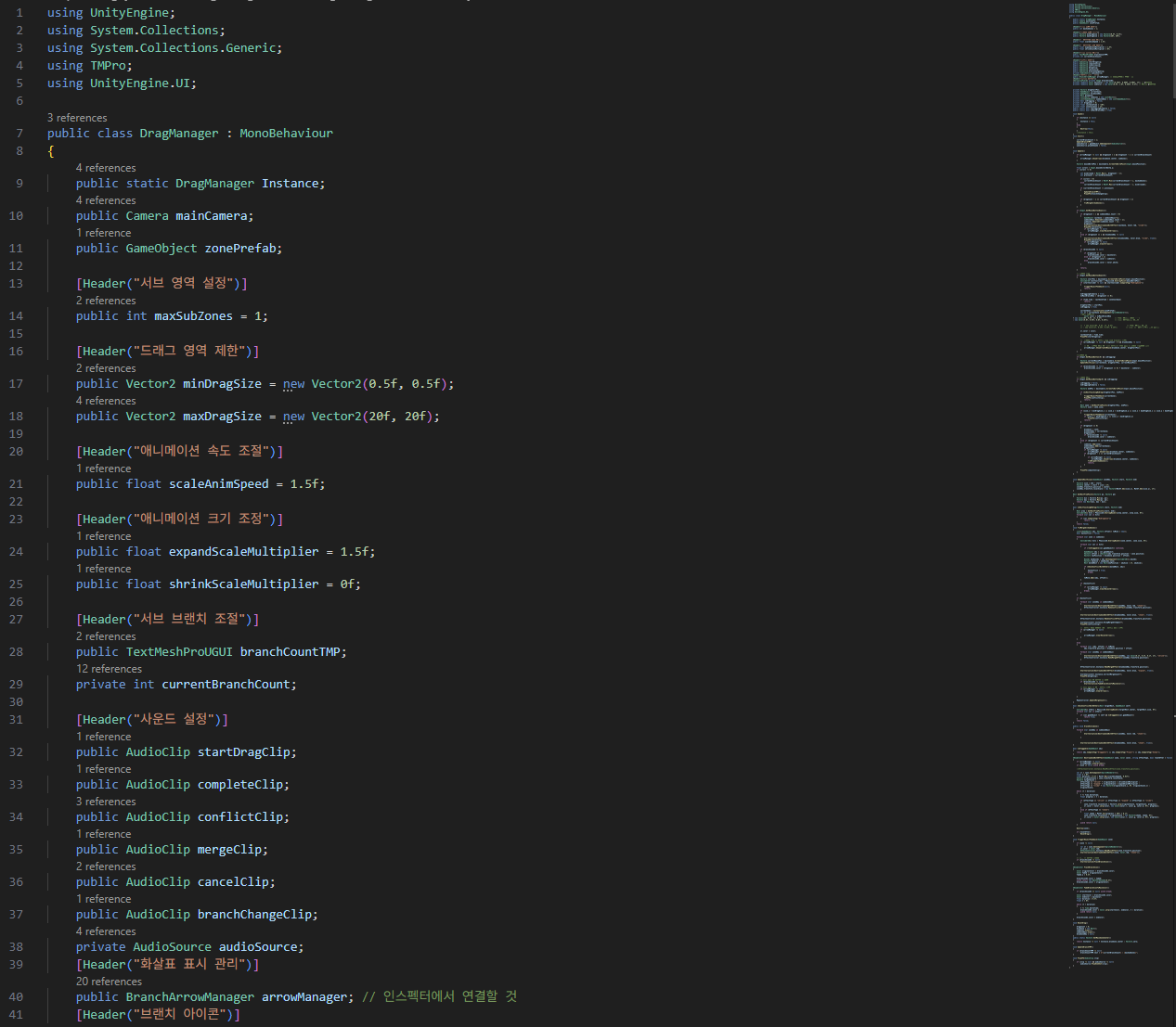
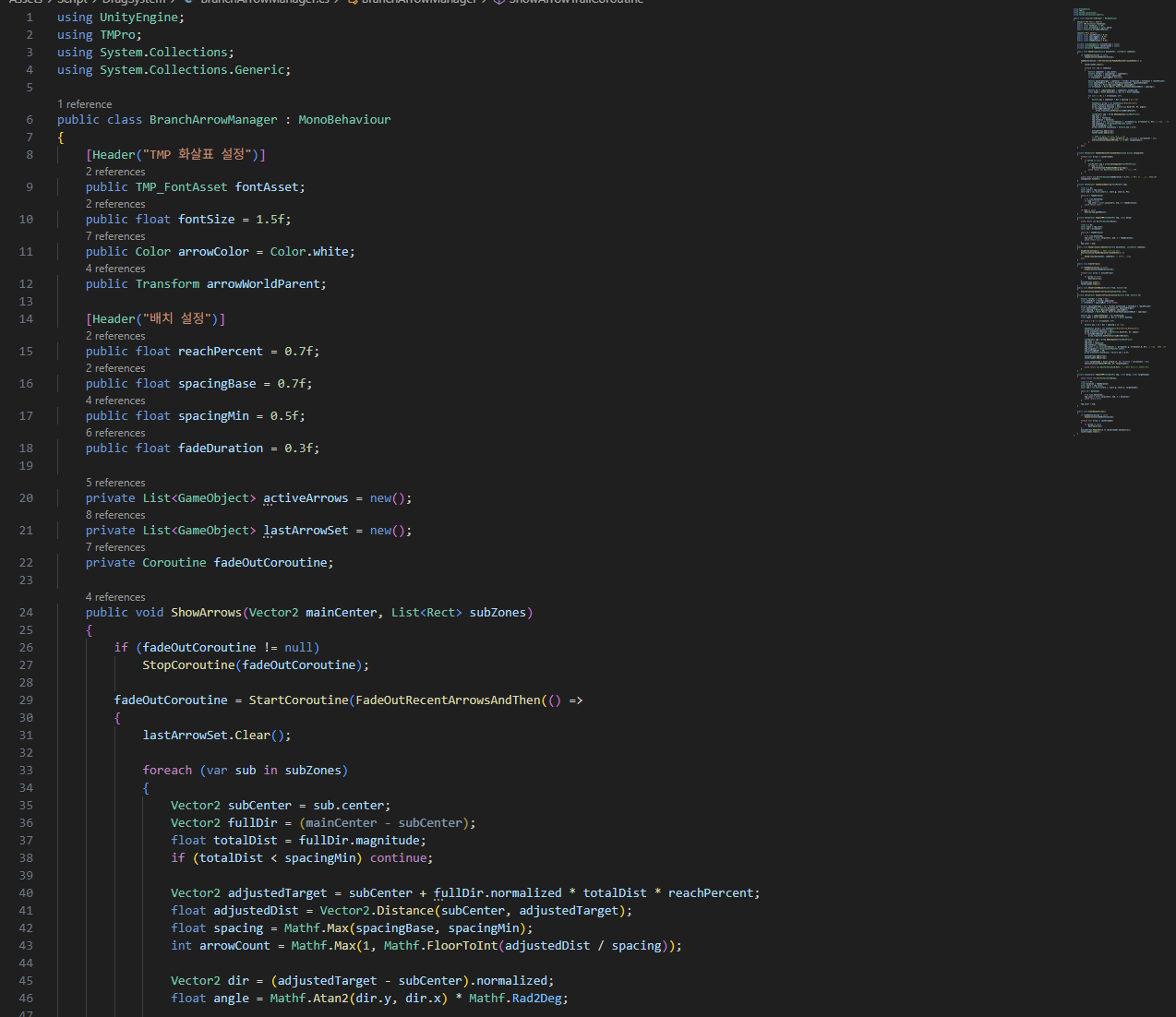
@merge effect글자 리소스 변경 제외
@우선 기획자가 작성한 프로토타입을 새로운시스템으로 개발을 해야할 필요성이 있었다.
- 문제점
1. 현재 드래그하여 물체를 이동하는 시스템의 코드가 모두 하나에 몰아져 있어 판정, 기능면에서 수정을 진행할 때, 코드가 복잡해지고, 수정시간도 오래 걸린다.
2. 영역을 이어주는 화살표의 위치가 정확하지 않으며, 플레이상에서 화살표의 표기 문제와 에러가 많이 발생하게 된다.
3. 영역 물체를 이동시켜주어야 하는데, 이동에 대한 명확한 기준이 정의되어 있지않고, 영역에서 얼마나 떨어져 있느냐에 대한 절대 위치만 가져온 뒤, 이동을 진행시켜주어, 물체가 이동할때 물체가 영역 바깥부분에 나오는 현상이 발생한다.
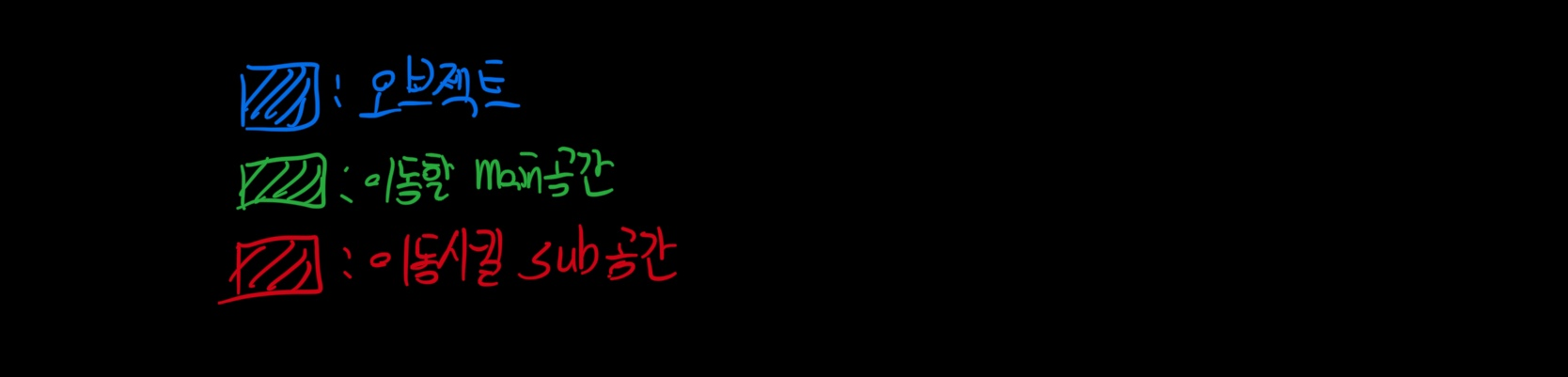
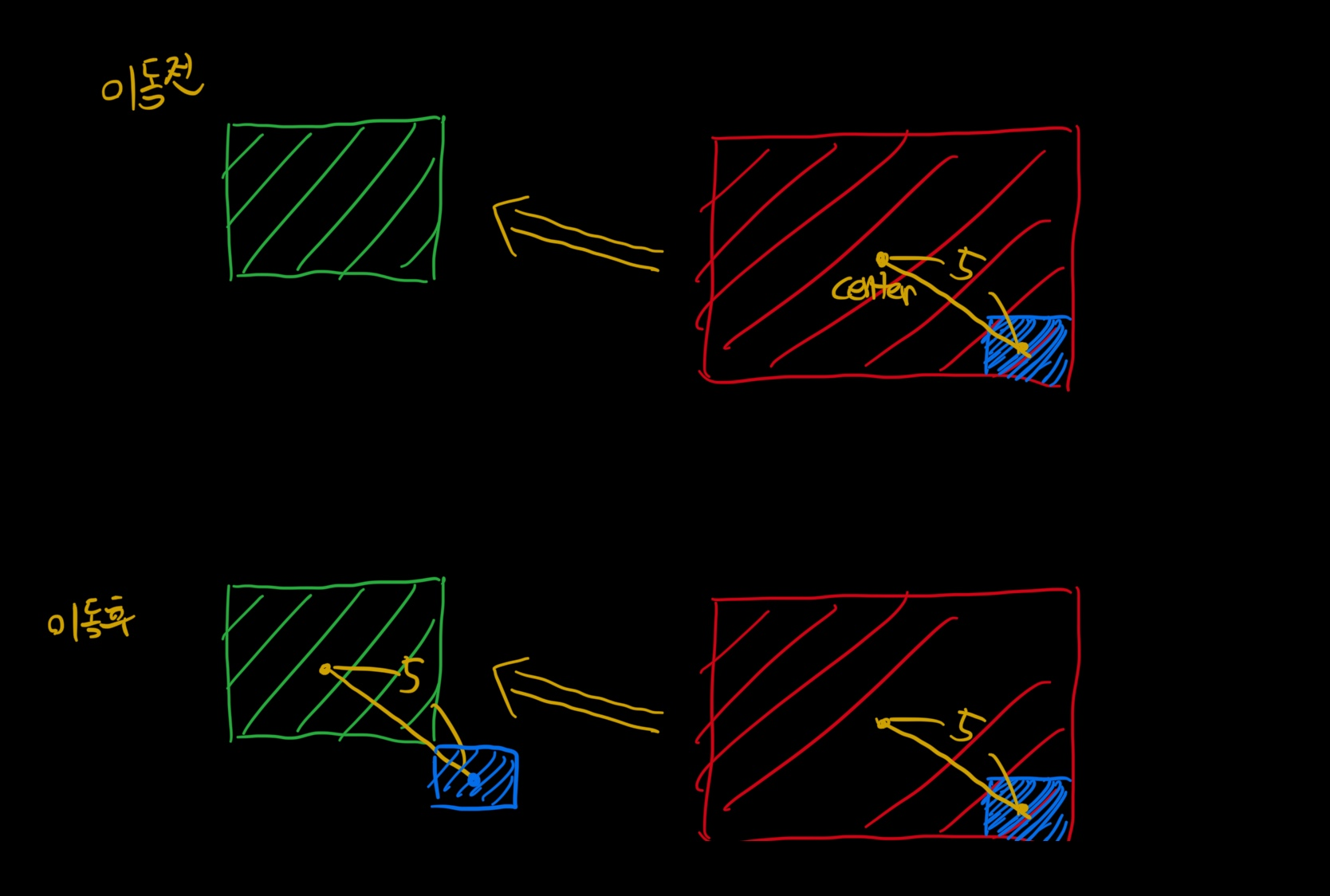
위 그림과같이, 이동 후에 이동할 main공간에서 벗어나서 생성됨을 확인할 수 있었다.
4. 조작키가
left mouse클릭 이후 영역생성,
right mouse click으로 생성된 영역 취소,
마우스 휠 조정으로 생성할 수 있는 sub공간 개수 조정
위와같이 3개의 조작인데, 각 조작을 하는 중, 다른 조작키를 눌러서 서로의 조작 기능에 방해를 주고, 조작을빠르게 할시 알수 없는 오류의 발생이 많았다.
ex) 코루틴 연출중, 다른 조작 요소가 먹히게 되어, 생성되는 영역이 투명해지거나, 제대로 공간이 생성이 되지 않는 문제가 발생하였다.
2. 개선사항 정리
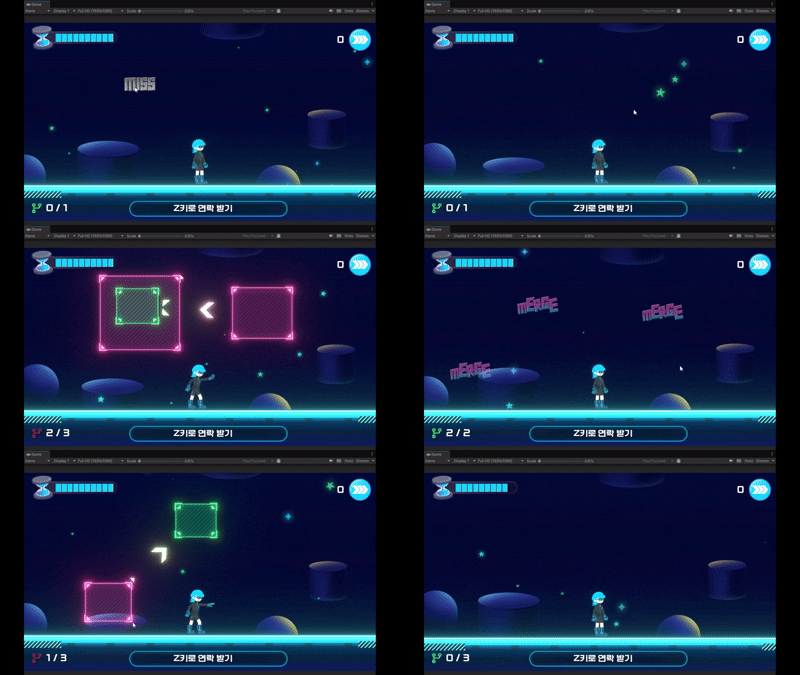
- 개선사항
1. 우선 코드의 가독성과 유지보수성을 높이기 위해 각 기능별 클래스를 따로 나누어주어 관리를 하기 시작했다.
- drag system 전체 관리 -> DragController
- drag system을 위한 mouse input 관리, 클릭 이벤트 수행 -> DragInput
- 물체 이동 시, 물체끼리의 겹침여부, 판정관련 계산 -> MergeCalculator
- 영역의 위치, 크기조절, 연출 코루틴을 담고있는 영역관련 클래스 -> ZonePool
- 영역 사이간 가이드 화살표 -> DragArrow, DragArrowUpdate
우선 다음과 같이 분류를 시작하고 해당부분을 다이어그램으로 만들어보면 다음과 같았다.
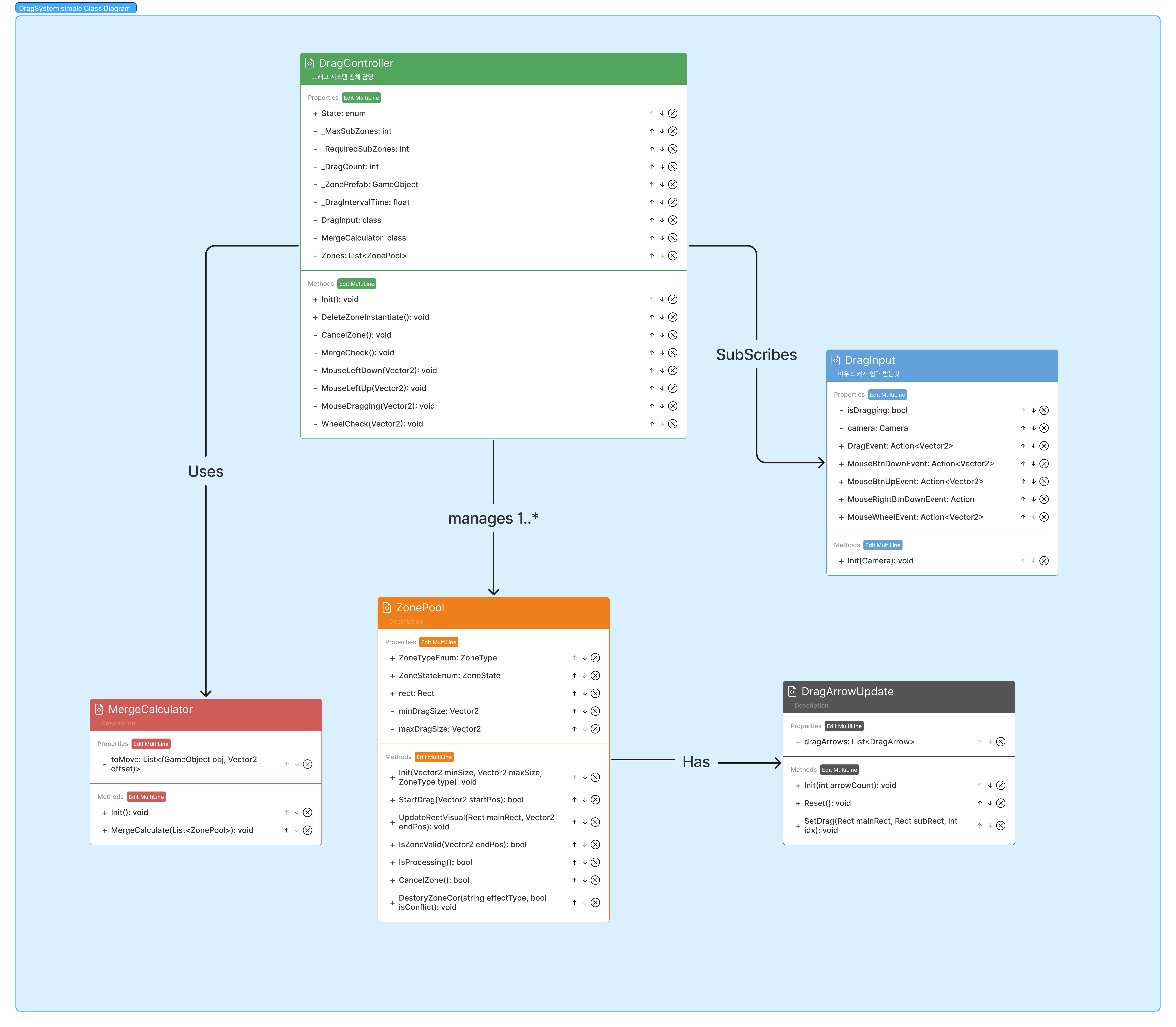
각 영역 별로 나눈 내용을 위와같이 비교적 간략하게 class diagram으로 구성한 것을 확인할 수 있다.
DragController에서 각 기능들을 담당하는 기능을 모아서 관리하고 있으며,
ZonePool에서는, 각 화살표 관련 인스턴스를 보관하여, 영역이 생성될 때, 화살표의 위치, 크기등을 업데이트 해준다.
DragInput에서 마우스의 각 입력을 받아 해당하는 이벤트를 실행해주는데, 이때, DragController에서 DragInput에 구독한 함수들을 수행해주게 된다.
DragController Init함수
/// <summary>
    /// 초기화 함수
    /// </summary>
    public void Init()
    {
        //component Init
        DragInput.Init(Camera.main);
        MergeCalculator.Init();


        //zone object pooling
        for (int i = 0; i < _MaxSubZones + 1; i++)
        {
            Zones.Add(Instantiate(_ZonePrefab, transform.position, Quaternion.identity).GetComponent<ZonePool>());
            Zones[i].Init(MinZoneSize, MaxZoneSize, ((i == 0) ? ZoneType.Main : ZoneType.Sub));
        }

        //private property reset
        _DragCount = 0;
        _RequiredSubZones = 1;


        //Subscribe DragInput Event
        DragInput.MouseBtnDownEvent += MouseLeftDown;

        DragInput.MouseBtnUpEvent += MouseLeftUp;

        DragInput.DragEvent += MouseDragging;

        DragInput.MouseRightBtnDownEvent += CancelZone;

        DragInput.MouseWheelEvent += WheelCheck;


        //UI Update
        MapUIContoller.Instance.UpdateBranchUI(_DragCount, _RequiredSubZones, 1);
    }
다음과 같이 DragController에서는 DragInput에 각 마우스관련 이벤트를 구독해주는 것을 확인 할 수 있으며,
생성되는 영역은 미리 prefab에서 생성을 해두어 obejct pooling방식으로 구현해둠을 확인할 수 있다.
2. DragArrowUpdate부분에서는 영역간 가이드 화살표를 관리하였는데,
화살표부분은 쉐이더로 관리하며 쉐이더내의 값을 변경하며 화살표의 간격, glow정도, scorll크기, 보간색상등을 조정할 수 있었다.
화살표관련 사이즈, 변수값등을 관리해주는 함수
/// <summary>
    /// 영역사이간 정보를 받아 화살표 간격, 방향 위치 조정
    /// </summary>
    /// <param name="size"> 두 영역사이 길이 </param>
    /// <param name="pos"> 두 영역사이 중간점 </param>
    /// <param name="rot"> 두 영역간의 방향 </param>
    public void ChangeSize(Vector2 size, Vector2 pos, Quaternion rot)
    {

        gameObject.transform.position = pos;
        gameObject.transform.rotation = rot;

        _SpriteRenderer.size = size;
        st.x = size.x;
        st.y = size.y;
        st.w = 0f;
        st.z = 0f;

        _materialProperty.SetVector("_MainTex_ST", st);
        _SpriteRenderer.SetPropertyBlock(_materialProperty);

        if (gameObject.activeSelf == false)
            gameObject.SetActive(true);

    }
쉐이더의 경우 하나의 화살표 이미지를 사용한 뒤, tilling의 x값을 조정해주어 화살표가 여러개 출력될 수 있도록해주었으며, 이를 시간에따라 왼쪽방향으로 옮김으로서 화살표의 이동을 구현하였다.
gpt의 도움을 많이 받았지만, 쉐이더 기초지식으로 질문을하니 만족할만한 퀄리티의 쉐이더로 구성해줄 수 있었다.
float4 frag (v2f i) : SV_Target
            {
                // --- continuous UV + scroll
                float2 uvCont = i.uvTex + _Scroll.xy * _Time.y;

                // --- tiling
                float P  = max(_PeriodX, 1e-4);
                float n0 = floor(uvCont.x / P);

                // --- gradients (continuous UV)
                float2 duvdx = ddx(uvCont);
                float2 duvdy = ddy(uvCont);
            }
3. 이후 DragInput관련으로는 마우스 조작시 드래그중 다른입력을 막거나, 마우스버튼의 down, up이 모두 이루어질 때까지 mouse input을 점유하도록 해주어, mouse button up event가 호출될때까지 반대방향 mouse button의 event가 일어나지 않도록해 input관련으로 생기는 다양한 버그를 예방해주었다.
/// <summary>
/// Mouse input을 받기위한 클래스
/// </summary>
public class DragInput : MonoBehaviour
{
...

	//각 마우스관련 action등록
    public event Action<Vector2> DragEvent;
    public event Action<Vector2> MouseBtnUpEvent;
    public event Action<Vector2> MouseBtnDownEvent;

    public event Action MouseRightBtnDownEvent;

    public event Action<Vector2> MouseWheelEvent;

    //mouse input lock
    private enum MouseOwner { None, Left, Right }
    private MouseOwner _owner = MouseOwner.None;

	private void OnScreenPosPerformed(InputAction.CallbackContext ctx)
    {
        curScreenPos = ctx.ReadValue<Vector2>();
    }

    private void OnPressPerformed(InputAction.CallbackContext ctx)
    {

        // 이미 다른 버튼이 점유 중이면 무시
        if (isDragging) return;

        if (_owner != MouseOwner.None) return;

        // 먼저 점유 설정 (동프레임 RightPress 경쟁 차단)
        _owner = MouseOwner.Left;

        // NoDragZone 클릭 시 드래그만 차단(점유는 유지)
        Collider2D startCollider = Physics2D.OverlapPoint(WorldPos);
        bool blocked = (startCollider != null && startCollider.CompareTag("NoDragZone"));

        if (!blocked && !isDragging)
        {
            if (dragCR != null) { StopCoroutine(dragCR); dragCR = null; }
            dragCR = StartCoroutine(Drag());
        }

        MouseBtnDownEvent?.Invoke(WorldPos);
    }

    private void OnPressCanceled(InputAction.CallbackContext ctx)
    {

        // 왼쪽 점유 중일 때만 해제후 실행
        if (_owner == MouseOwner.Left)
        {
            _owner = MouseOwner.None;

            isDragging = false;
            MouseBtnUpEvent?.Invoke(WorldPos);
        }
        else
        {
            return;
        }
    }

    private void OnRightPressPerformed(InputAction.CallbackContext ctx)
    {
        if (isDragging) return;

        // 이미 다른 버튼이 점유 중이거나 드래그 중이면 무시
        if (_owner != MouseOwner.None) return;

        _owner = MouseOwner.Right;
        MouseRightBtnDownEvent?.Invoke();
    }

    private void OnRightPressCanceled(InputAction.CallbackContext ctx)
    {
        if (_owner == MouseOwner.Right)
        {
            _owner = MouseOwner.None;
        }
        else
        {
            return;
        }
    }

    private void OnMouseWheelPerformed(InputAction.CallbackContext ctx)
    {
        if (isDragging) return;
        MouseWheelEvent?.Invoke(ctx.ReadValue<Vector2>());
    }


    //drag진행 코루틴
    private IEnumerator Drag()
    {
        isDragging = true;

        while (isDragging)
        {
            DragEvent?.Invoke(WorldPos);
            yield return null;
        }

        dragCR = null;
    }
}
4. 물체의 이동판정관련하여서는, 각 영역에서의 위치를 정규화하여 이동시켜줌으로서, 항상 이동하는 물체는 영역안으로 이동되게 구조를 바꾸어주었다.
GameObject obj = col.gameObject;


var src = zones[i].rect;
var dst = blueZone;


var b = obj.GetComponent<Collider2D>().bounds;
Vector2 ext = b.extents;

//각 src의 rect에서 어느정도 멀어져있는지의 비율을 iverse lerp를 통해 계산
float tx = Mathf.InverseLerp(src.xMin + ext.x, src.xMax - ext.x, obj.transform.position.x);
float ty = Mathf.InverseLerp(src.yMin + ext.y, src.yMax - ext.y, obj.transform.position.y);
tx = Mathf.Clamp01(tx);
ty = Mathf.Clamp01(ty);


//이후 dstination의 rect에서 몇좌표 떨어져있는지를 위에서 구했던 비율을 이용해 계산
float nx = Mathf.Lerp(dst.xMin + ext.x, dst.xMax - ext.x, tx);
float ny = Mathf.Lerp(dst.yMin + ext.y, dst.yMax - ext.y, ty);


//offset구성
Vector2 offset = new Vector2(nx, ny) - dst.position;

//새로운 position 구하기
Vector2 newPosition = blueZone.position + offset;
위와같이 InverseLerp함수를 통해 src영역에서 얼마나 떨어져있는지 비율을 구하고,
destination의 영역에서 얼마나 떨어져있어야할지 구하는 식을 확인해줄 수 있다.
위와같은 일련의 과정으로 Dragsystem의 리뉴얼을 진행했으며 여러가지 버그수정도 진행할 수 있었다.
수정코드 모음
using System.Collections;
using System.Collections.Generic;
using UnityEngine;

/// <summary>
/// 생성되는 영역
/// </summary>
public class ZonePool : MonoBehaviour
{

    #region PropertyZone
    public ZoneType ZoneTypeEnum;
    private Vector2 _Pos;
    [SerializeField]
    private Vector2 _Size;
    public ZoneState ZoneStateEnum;

    private SpriteRenderer _spriteRenderer;
    //private BoxCollider2D _collider2D;

    private Vector2 minDragSize; //영역 최소크기
    private Vector2 maxDragSize;

    [Header("연출관련")]
    [SerializeField] private float scaleAnimSpeed = 1f;
    [SerializeField] private float shrinkScaleMultiplier = 0.2f;
    [SerializeField] private float expandScaleMultiplier = 1.5f;

    private bool _productionProgress = false;


    [Header("Sprite")] //각 sprite정보, material저장
    [SerializeField] private Sprite mainSprite;
    [SerializeField] private Sprite subSprite;

    [SerializeField] private List<SpriteRenderer> _subRenderers;
    [SerializeField] private List<Sprite> _mainSprites;
    [SerializeField] private List<Sprite> _subSprites;

    [SerializeField] private Material _zoneGlowMatMain;
    [SerializeField] private Material _zoneGlowMatSub;
    public static readonly Color mainColor = Color.white;//new Color(0.392f, 0.898f, 0.996f, 0.4f); // #64E5FE
    public static readonly Color subColor = Color.white;//new Color(0.0f, 1.0f, 0.553f, 0.4f); // 청록색 #00FF8D

    public static readonly Color cancelColor = Color.white;//new Color(0.1f, 0.4f, 0.1f, 1f);

    private Color OriginalColor;
    public Rect rect;

    [Header("Arrow")]
    [SerializeField] private DragArrowUpdate dragArrowUpdate;


    #endregion


    #region LifeCycles

    void Awake()
    {
        _spriteRenderer = gameObject.GetComponent<SpriteRenderer>();

        OriginalColor = _spriteRenderer.color;
        dragArrowUpdate.Init(1);

    }

    #endregion


    #region Methods

    /// <summary>
    /// 초기화함수
    /// </summary>
    /// <param name="MinSize">영역 최소 사이즈</param>
    /// <param name="MaxSize">영역 최대 사이즈</param>
    /// <param name="zoneType">zonetype default = main</param>
    public void Init(Vector2 MinSize, Vector2 MaxSize, ZoneType zoneType = ZoneType.Main)
    {
        dragArrowUpdate.Reset();

        //size조정
        _spriteRenderer.size = Vector2.zero;
        _spriteRenderer.color = OriginalColor;
        _Size = Vector2.zero;
        for (int i = 0; i < _subRenderers.Count; i++)
        {
            _subRenderers[i].size = Vector2.zero;
            _subRenderers[i].color = OriginalColor;
        }


        //setting value
        minDragSize = MinSize;
        maxDragSize = MaxSize;
        ZoneTypeEnum = zoneType;


        gameObject.SetActive(false);
        _productionProgress = false;


        //main, sub에 따라 각 영역의 sprite, material proerty바꾸어주기
        switch (ZoneTypeEnum)
        {
            case ZoneType.Main:
                _spriteRenderer.color = mainColor; _spriteRenderer.sprite = mainSprite;
                for (int i = 0; i < _subRenderers.Count; i++)
                {
                    _subRenderers[i].sprite = _mainSprites[i];

                    _subRenderers[i].material = _zoneGlowMatMain;

                }
                break;

            case ZoneType.Sub:
                _spriteRenderer.color = subColor; _spriteRenderer.sprite = subSprite;
                for (int i = 0; i < _subRenderers.Count; i++)
                {
                    _subRenderers[i].sprite = _subSprites[i];

                    _subRenderers[i].material = _zoneGlowMatSub;

                }
                break;
        }
    }

    /// <summary>
    /// Drag start 함수, 성공시 true return
    /// </summary>
    /// <param name="StartPos">drag 시작위치</param>
    public bool StartDrag(Vector2 StartPos)
    {
        if (_productionProgress) return false;

        _Pos = StartPos;
        _spriteRenderer.size = Vector2.zero;
        for (int i = 0; i < _subRenderers.Count; i++)
        {
            _subRenderers[i].size = Vector2.zero;
        }
        //_collider2D.size = Vector2.zero;

        gameObject.SetActive(true);

        return true;

    }


    /// <summary>
    /// 영역의 크기변경
    /// </summary>
    /// <param name="Mainrect">영역 rect</param>
    /// <param name="end">end위치</param>
    public void UpdateRectVisual(Rect Mainrect, Vector2 end)
    {
        if (_productionProgress) return;

        Vector2 size = end - _Pos;
        Vector2 center = _Pos + size / 2f;
        gameObject.transform.position = center;


        //size +로 만들기
        size.x = Mathf.Abs(size.x);
        size.y = Mathf.Abs(size.y);
        _Size = size;

        _spriteRenderer.size = size;
        for (int i = 0; i < _subRenderers.Count; i++)
        {
            _subRenderers[i].size = size;
        }

        //_collider2D?.size = size;

        SetRectFromPoints(_Pos, end);
        //gameObject.transform.localScale = new Vector3(Mathf.Abs(size.x), Mathf.Abs(size.y), 1f);

        if (ZoneTypeEnum == ZoneType.Sub)
        {
            dragArrowUpdate.SetDrag(Mainrect, rect, 0);
        }
    }


    /// <summary>
    /// 생성한 영역이 올바른 영역인지 판별
    /// </summary>
    /// <param name="pos">영역의 위치</param>
    /// <returns></returns>
    public bool IsZoneValid(Vector2 pos)
    {
        return !IsRectTouchingNoDrag(_Pos, pos) && !(_Size.x < minDragSize.x || _Size.y < minDragSize.y || _Size.x > maxDragSize.x || _Size.y > maxDragSize.y) && !_productionProgress && gameObject.activeSelf;
    }

    /// <summary>
    /// 현재 영역이 연출상태인지를 전달
    /// </summary>
    /// <returns></returns>
    public bool IsProcessing()
    {
        return _productionProgress;
    }


    /// <summary>
    /// 생성된 영역 취소
    /// </summary>
    public bool CancelZone()
    {
        if (_productionProgress) return false;

        StartCoroutine(DestroyZoneWithEffect_BySize(_spriteRenderer, cancelColor, "slide"));
        for (int i = 0; i < _subRenderers.Count; i++)
        {
            StartCoroutine(DestroyZoneWithEffect_BySize(_subRenderers[i], cancelColor, "slide", (i == _subRenderers.Count - 1)));
        }

        dragArrowUpdate.Reset();
        //Init(minDragSize, maxDragSize, ZoneTypeEnum);

        return true;

    }

    /// <summary>
    /// merge, conflict 실행이후 영역 종료
    /// </summary>
    /// <param name="effectType">표기 effect종류(shrink, expand, slide)</param>
    /// <param name="isConflict"></param>
    public void DestoryZoneCor(string effectType, bool isConflict)
    {

        StartCoroutine(DestroyZoneWithEffect_BySize(_spriteRenderer, cancelColor, effectType));
        for (int i = 0; i < _subRenderers.Count; i++)
        {
            StartCoroutine(DestroyZoneWithEffect_BySize(_subRenderers[i], cancelColor, effectType, (i == _subRenderers.Count - 1)));
        }

        dragArrowUpdate.Reset();
    }


    /// <summary>
    /// rect가 nodragzone touch중인지 판별
    /// </summary>
    /// <param name="start">시작점</param>
    /// <param name="end">끝점</param>
    /// <returns></returns>
    bool IsRectTouchingNoDrag(Vector2 start, Vector2 end)
    {
        Rect area = GetRectFromPoints(start, end);
        Collider2D[] hits = Physics2D.OverlapBoxAll(area.center, area.size, 0f);
        foreach (var col in hits)
        {
            if (col.CompareTag("NoDragZone"))
                return true;
        }
        return false;
    }

    private Rect GetRectFromPoints(Vector2 p1, Vector2 p2)
    {
        Vector2 min = Vector2.Min(p1, p2);
        Vector2 max = Vector2.Max(p1, p2);
        return new Rect(min, max - min);
    }

    private void SetRectFromPoints(Vector2 p1, Vector2 p2)
    {
        Vector2 min = Vector2.Min(p1, p2);
        Vector2 max = Vector2.Max(p1, p2);

        rect.position = min;
        rect.size = max - min;

    }

    #endregion


    #region ProductionFunction

    private IEnumerator DestroyZoneWithEffect_BySize(SpriteRenderer spriteRenderer, Color color, string effectType, bool timeCheck = false)
    {
        if (timeCheck)
            _productionProgress = true;


        var sr = spriteRenderer;

        if (sr == null) yield break;

        // drawMode가 Simple이면 size가 무시되므로 강제로 Sliced로 전환
        if (sr.drawMode == SpriteDrawMode.Simple)
            sr.drawMode = SpriteDrawMode.Sliced;  // (필요시 임포터: Mesh Type = Full Rect)

        float t = 0f;
        float duration = 0.3f / Mathf.Max(scaleAnimSpeed, 0.01f);

        // 현재 크기(월드 유닛). drawMode가 Simple이었으면 sprite/bounds로 추정
        Vector2 originalSize = sr.size;
        if (originalSize == Vector2.zero)
        {
            var s = gameObject.transform.lossyScale;
            // sprite.bounds.size는 로컬 유닛. 스케일 반영
            Vector2 spriteSize = sr.sprite ? (Vector2)sr.sprite.bounds.size : Vector2.one;
            originalSize = new Vector2(spriteSize.x * s.x, spriteSize.y * s.y);
        }

        // 목표 크기 계산
        Vector2 targetSize =
            effectType == "shrink" ? originalSize * shrinkScaleMultiplier :
            effectType == "expand" ? originalSize * expandScaleMultiplier :
            effectType == "slide" ? new Vector2(originalSize.x, 0f) :
                                    originalSize; // 기본: 크기 유지(페이드만)

        // 시작 색 지정(옵션)
        sr.color = color;

        while (t < duration)
        {
            t += Time.deltaTime;
            float progress = Mathf.Clamp01(t / duration);

            if (effectType == "shrink" || effectType == "expand" || effectType == "slide")
            {
                // 최소값 클램프(음수/0 방지)
                var sz = Vector2.Lerp(originalSize, targetSize, progress);
                sz.x = Mathf.Max(0.0001f, sz.x);
                sz.y = Mathf.Max(0.0001f, sz.y);
                sr.size = sz;

                sr.color = Color.Lerp(color, new Color(color.r, color.g, color.b, 0f), progress);
            }
            else if (effectType == "shake")
            {
                // size 기반의 흔들기: x/y를 미세 진동
                float shake = Mathf.Sin(progress * 40f) * 0.1f; // 진폭은 필요에 맞게
                var sz = originalSize + new Vector2(shake, shake);
                sz.x = Mathf.Max(0.0001f, sz.x);
                sz.y = Mathf.Max(0.0001f, sz.y);
                sr.size = sz;

                sr.color = Color.Lerp(color, new Color(color.r, color.g, color.b, 0f), progress);
            }
            else
            {
                // 알 수 없는 타입: 페이드만
                sr.color = Color.Lerp(color, new Color(color.r, color.g, color.b, 0f), progress);
            }

            yield return null;
        }


        if (timeCheck)
        {
            Init(minDragSize, maxDragSize, ZoneTypeEnum);
        }

    }

    #endregion


    #region Debuggins

#if UNITY_EDITOR
    // 오브젝트 선택 시에만 보이게 하려면 OnDrawGizmosSelected, 항상 보이게 하려면 OnDrawGizmos로 바꿔도 됨
    private void OnDrawGizmosSelected()
    {
        DrawOverlapRectGizmo(rect, 0f, new Color(0f, 1f, 1f, 0.15f), Color.cyan);
    }
#endif

    /// <summary>
    /// OverlapBox 영역을 기즈모로 그림(채움 + 외곽선)
    /// </summary>
    public static void DrawOverlapRectGizmo(Rect r, float angleDeg, Color fill, Color outline)
    {
        // OverlapBoxAll과 동일하게 "월드 좌표" 기준
        Vector3 center = new Vector3(r.center.x, r.center.y, 0f);
        Vector3 size = new Vector3(r.size.x, r.size.y, 0.001f); // z를 아주 얇게
        Quaternion rot = Quaternion.Euler(0f, 0f, 0f);

        var prevMatrix = Gizmos.matrix;
        var prevColor = Gizmos.color;

        Gizmos.matrix = Matrix4x4.TRS(center, rot, Vector3.one);

        // 채움
        Gizmos.color = fill;
        Gizmos.DrawCube(Vector3.zero, size);

        // 외곽선
        Gizmos.color = outline;
        Gizmos.DrawWireCube(Vector3.zero, size);

        Gizmos.color = prevColor;
        Gizmos.matrix = prevMatrix;
    }

    #endregion
}
using System.Collections.Generic;
using UnityEngine;
#region DragSystemType
/// <summary>
/// Zonetype : 영역의 타입 지정
/// - Main : 처음 생성하는 영역 ( 합쳐지는 영역 )
/// - Sub : 처음 이후 생성하는 영역 ( 옮길 영역 )
/// </summary>
public enum ZoneType { Main, Sub }
/// <summary>
/// ZoneState : 현재 영역의 상태
/// - Dragging : 현재 드래그하며 영역을 키우는 중
/// - Fixed : 드래그가 완료되어 영역의 넓이가 고정된 상태
/// </summary>
///
public enum ZoneState { Dragging, Fixed }
#endregion
/*
StartDrag
CompleteDrag
Conflict
Merge
DragCancel
BranchChange
*/
/// <summary>
/// DragSystem전체를 관리
/// </summary>
public class DragController : MonoBehaviour
{
#region PropertyZone
//드래그 가능 여부 static함수
public static bool CanDrag = true;
[Header("Settings")]
[SerializeField] private int _MaxSubZones; // 생성가능한 최대 zone의 한계치
[SerializeField] private int _RequiredSubZones; // 현재 생성가능한 최대 zone
private int _DragCount; // 현재 생성된 zone의 수
private List<ZonePool> Zones = new(); // 현재 생성된 zone List
[SerializeField] private Vector2 MinZoneSize; // zone최소 크기
[SerializeField] private Vector2 MaxZoneSize; // zone최대 크기
[SerializeField] private GameObject _ZonePrefab; //zone Prefab
[SerializeField] private float _DragIntervalTime; //드래그 쿨다운
[Header("Components")]
[SerializeField] private DragInput DragInput;
[SerializeField] private MergeCalculator MergeCalculator;
#endregion
#region Methods
/// <summary>
/// 초기화 함수
/// </summary>
public void Init()
{
//component Init
DragInput.Init(Camera.main);
MergeCalculator.Init();
//zone object pooling
for (int i = 0; i < _MaxSubZones + 1; i++)
{
Zones.Add(Instantiate(_ZonePrefab, transform.position, Quaternion.identity).GetComponent<ZonePool>());
Zones[i].Init(MinZoneSize, MaxZoneSize, ((i == 0) ? ZoneType.Main : ZoneType.Sub));
}
//private property reset
_DragCount = 0;
_RequiredSubZones = 1;
//Subscribe DragInput Event
DragInput.MouseBtnDownEvent += MouseLeftDown;
DragInput.MouseBtnUpEvent += MouseLeftUp;
DragInput.DragEvent += MouseDragging;
DragInput.MouseRightBtnDownEvent += CancelZone;
DragInput.MouseWheelEvent += WheelCheck;
//UI Update
MapUIContoller.Instance.UpdateBranchUI(_DragCount, _RequiredSubZones, 1);
}
/// <summary>
/// 즉시 모든 생성된 zone 비활성화
/// </summary>
public void DeleteZoneInstantiate()
{
_DragCount = 0;
for (int i = 0; i < Zones.Count; i++)
{
Zones[i].Init(MinZoneSize, MaxZoneSize, ((i == 0) ? ZoneType.Main : ZoneType.Sub));
}
}
/// <summary>
/// 마지막으로 생성된 영역 취소하고 지우기
/// </summary>
private void CancelZone()
{
if (!CanDrag) return;
if (_DragCount == 0) return;
//logic
if (!Zones[_DragCount - 1].CancelZone()) return;
_DragCount--;
//sound
SoundController.Instance.Play_Effect("DragCancel", 1f, false);
//UI update
MapUIContoller.Instance.UpdateBranchUI(_DragCount - 1, _RequiredSubZones, 2);
}
/// <summary>
/// Merge진행 시, 물체이동, 판별진행
/// </summary>
private void MergeCheck()
{
MergeCalculator.MergeCalculate(Zones);
try
{
MapController.currentRoom.MergeUIUpdate();
}
catch
{
Debug.Log("mapcontroller is not allocated");
}
}
private void MouseLeftDown(Vector2 pos)
{
if (!CanDrag) return;
//logic
if (!Zones[_DragCount].StartDrag(pos)) return;
//sound
SoundController.Instance.Play_Effect("StartDrag", 1f, false);
//UI update
MapUIContoller.Instance.UpdateBranchUI(_DragCount, _RequiredSubZones, 2);
}
private void MouseLeftUp(Vector2 pos)
{
if (!CanDrag) return;
//zones[_dragCount] 가 no dragzone에 들어가지 않았다면, 그리고 최소조건을 만족했다면
//생성완료하고 dragCount++하기, 그리고 dragcount길이가 zones.count넘어서면, 0으로 초기화하기?
//위 조건을 만족 못했다면, dragcount++해주지 않고,
//zones[_dragcount] Init호출해주고, miss effect호출해주게끔하면 된다.
if (Zones[_DragCount].IsProcessing()) return;
if (Zones[_DragCount].IsZoneValid(pos))
{
//알맞은 zone 일경우(크기, 위치등이 문제가 없을경우)
//sound
SoundController.Instance.Play_Effect("CompleteDrag", 1f, false);
//logic
_DragCount++;
if (_DragCount > _RequiredSubZones)
{
MergeCheck();
_DragCount = 0;
//UI update
MapUIContoller.Instance.UpdateBranchUI(_DragCount - 1, _RequiredSubZones, 2);
return;
}
if (_DragCount >= Zones.Count)
{
_DragCount = 0;
}
//UI update
MapUIContoller.Instance.UpdateBranchUI(_DragCount - 1, _RequiredSubZones, 2);
}
else
{
//알맞은 zone이 아닐경우(크기, 위치등에 문제가 있을경우)
//logic
Zones[_DragCount].Init(MinZoneSize, MaxZoneSize, Zones[_DragCount].ZoneTypeEnum);
//sound
SoundController.Instance.Play_Effect("DragCancel", 1f, false);
//effect visual
EffectController.Instance.MakeMissEffect(Zones[_DragCount].transform.position);
//UI update
MapUIContoller.Instance.UpdateBranchUI(_DragCount - 1, _RequiredSubZones, 2);
}
}
private void MouseDragging(Vector2 pos)
{
if (!CanDrag) return;
//zone의 크기를 계속해서 변형
Zones[_DragCount].UpdateRectVisual((_DragCount > 0) ? Zones[0].rect : Rect.zero, pos);
}
private void WheelCheck(Vector2 scrollpos)
{
if (!CanDrag) return;
if (scrollpos == Vector2.zero) return;
if (scrollpos.y >= 0)
{
//scorll up
if (_RequiredSubZones < _MaxSubZones)
{
_RequiredSubZones++;
//TODO: ui update하기
MapUIContoller.Instance.UpdateBranchUI(_DragCount - 1, _RequiredSubZones, 0);
SoundController.Instance.Play_Effect("BranchChange", 1f, false);
}
}
else
{
//scroll down
if (_RequiredSubZones > 1)
{
_RequiredSubZones--;
//TODO: ui update하기
MapUIContoller.Instance.UpdateBranchUI(_DragCount - 1, _RequiredSubZones, 0);
SoundController.Instance.Play_Effect("BranchChange", 1f, false);
//TODO: mergecheck하기
if (_DragCount > _RequiredSubZones)
{
MergeCheck();
_DragCount = 0;
}
}
}
}
#endregion
}using System;
using System.Collections;
using UnityEngine;
using UnityEngine.InputSystem;
/// <summary>
/// Mouse input을 받기위한 클래스
/// </summary>
public class DragInput : MonoBehaviour
{
#region PropertyZone
//각 Input Event
[SerializeField] private InputAction press, screenPos, RightPress, MouseWheel;
// Properties / Fields
[SerializeField] private float _DragIntervalTime; //drag사이간 간격
//각 마우스관련 action등록
public event Action<Vector2> DragEvent;
public event Action<Vector2> MouseBtnUpEvent;
public event Action<Vector2> MouseBtnDownEvent;
public event Action MouseRightBtnDownEvent;
public event Action<Vector2> MouseWheelEvent;
private Vector3 WorldPos
{
get
{
if (camera != null)
{
float z = camera.WorldToScreenPoint(transform.position).z;
return camera.ScreenToWorldPoint(curScreenPos + new Vector3(0, 0, z));
}
return Vector3.zero;
}
}
private Vector3 curScreenPos; // 현재 스크린 좌표
private bool isDragging; // 드래그 진행 여부
private Camera camera; // 메인 카메라 참조
private Coroutine dragCR; // 드래그 코루틴 핸들
private bool _subscribed; // 중복 구독 방지 플래그
//mouse input lock
private enum MouseOwner { None, Left, Right }
private MouseOwner _owner = MouseOwner.None;
#endregion
#region LifeCycles
/// <summary>
/// diable시 구독정보 초기화
/// </summary>
void OnDisable()
{
isDragging = false;
if (dragCR != null)
{
StopCoroutine(dragCR);
dragCR = null;
}
// InputAction 구독/활성화 해제
UnsubscribeInputActions();
//점유해제
_owner = MouseOwner.None;
// 외부 이벤트 구독자 정리(선택)
DragEvent = null;
MouseBtnUpEvent = null;
MouseBtnDownEvent = null;
MouseRightBtnDownEvent = null;
MouseWheelEvent = null;
}
#endregion
#region Methods
/// <summary>
/// 초기화 함수
/// </summary>
/// <param name="cam">현재 platformer의 main 카메라 입력받음</param>
public void Init(Camera cam)
{
//private property reset
isDragging = false;
camera = cam;
//점유초기화
_owner = MouseOwner.None;
SubscribeInputActions();
}
/// <summary>
/// Input action 구독
/// </summary>
private void SubscribeInputActions()
{
if (_subscribed) return;
// Enable
screenPos?.Enable();
press?.Enable();
RightPress?.Enable();
MouseWheel?.Enable();
// Subscribe (메서드 핸들로 등록해야 해제 가능)
if (screenPos != null) screenPos.performed += OnScreenPosPerformed;
if (press != null)
{
press.performed += OnPressPerformed;
press.canceled += OnPressCanceled;
}
if (RightPress != null)
{
RightPress.performed += OnRightPressPerformed;
RightPress.canceled += OnRightPressCanceled;
}
if (MouseWheel != null) MouseWheel.performed += OnMouseWheelPerformed;
_subscribed = true;
}
/// <summary>
/// Input Action 구독해제
/// </summary>
private void UnsubscribeInputActions()
{
if (!_subscribed) return;
// Unsubscribe
if (screenPos != null) screenPos.performed -= OnScreenPosPerformed;
if (press != null)
{
press.performed -= OnPressPerformed;
press.canceled -= OnPressCanceled;
}
if (RightPress != null)
{
RightPress.performed -= OnRightPressPerformed;
RightPress.canceled -= OnRightPressCanceled;
}
if (MouseWheel != null) MouseWheel.performed -= OnMouseWheelPerformed;
// Disable
screenPos?.Disable();
press?.Disable();
RightPress?.Disable();
MouseWheel?.Disable();
_subscribed = false;
}
private void OnScreenPosPerformed(InputAction.CallbackContext ctx)
{
curScreenPos = ctx.ReadValue<Vector2>();
}
private void OnPressPerformed(InputAction.CallbackContext ctx)
{
// 이미 다른 버튼이 점유 중이면 무시
if (isDragging) return;
if (_owner != MouseOwner.None) return;
// 먼저 점유 설정 (동프레임 RightPress 경쟁 차단)
_owner = MouseOwner.Left;
// NoDragZone 클릭 시 드래그만 차단(점유는 유지)
Collider2D startCollider = Physics2D.OverlapPoint(WorldPos);
bool blocked = (startCollider != null && startCollider.CompareTag("NoDragZone"));
if (!blocked && !isDragging)
{
if (dragCR != null) { StopCoroutine(dragCR); dragCR = null; }
dragCR = StartCoroutine(Drag());
}
MouseBtnDownEvent?.Invoke(WorldPos);
}
private void OnPressCanceled(InputAction.CallbackContext ctx)
{
// 왼쪽 점유 중일 때만 해제후 실행
if (_owner == MouseOwner.Left)
{
_owner = MouseOwner.None;
isDragging = false;
MouseBtnUpEvent?.Invoke(WorldPos);
}
else
{
return;
}
}
private void OnRightPressPerformed(InputAction.CallbackContext ctx)
{
if (isDragging) return;
// 이미 다른 버튼이 점유 중이거나 드래그 중이면 무시
if (_owner != MouseOwner.None) return;
_owner = MouseOwner.Right;
MouseRightBtnDownEvent?.Invoke();
}
private void OnRightPressCanceled(InputAction.CallbackContext ctx)
{
if (_owner == MouseOwner.Right)
{
_owner = MouseOwner.None;
}
else
{
return;
}
}
private void OnMouseWheelPerformed(InputAction.CallbackContext ctx)
{
if (isDragging) return;
MouseWheelEvent?.Invoke(ctx.ReadValue<Vector2>());
}
//drag진행 코루틴
private IEnumerator Drag()
{
isDragging = true;
while (isDragging)
{
DragEvent?.Invoke(WorldPos);
yield return null;
}
dragCR = null;
}
#endregion
}using UnityEngine;
using System.Collections.Generic;
public class MergeCalculator : MonoBehaviour
{
private List<(GameObject obj, Vector2 offset)> toMove = new();
// Methods
public void Init()
{
toMove.Clear();
}
public void MergeCalculate(List<ZonePool> zones)
{
if (zones.Count <= 0) return;
Rect blueZone = zones[0].rect;
bool hasConflict = false;
for (int i = 1; i < zones.Count; i++)
{
if (zones[i].gameObject.activeSelf == false) continue;
Collider2D[] hits = Physics2D.OverlapBoxAll(zones[i].rect.center, zones[i].rect.size, 0f);
//zones[i].CancelZone();
foreach (var col in hits)
{
if (!IsDraggable(col.gameObject)) continue;
//Debug.LogError("HasConflict");
// GameObject obj = col.gameObject;
// Vector2 offset = (Vector2)obj.transform.position - zones[i].rect.position;
// Vector2 newPosition = blueZone.position + offset;
// Bounds objBounds = obj.GetComponent<Collider2D>().bounds;
// Vector2 objSize = objBounds.size;
// Rect movedRect = new Rect(newPosition - objSize / 2f, objSize);
GameObject obj = col.gameObject;
// --- offset 계산 교체 (오브젝트 크기 보정 포함) ---
var src = zones[i].rect; // 소스 존
var dst = blueZone; // 타깃 존
var b = obj.GetComponent<Collider2D>().bounds;
Vector2 ext = b.extents; // 오브젝트 반크기(월드 단위)
// 소스 존의 "내부 사각형"(extents 만큼 안쪽)에서의 정규화 좌표
float tx = Mathf.InverseLerp(src.xMin + ext.x, src.xMax - ext.x, obj.transform.position.x);
float ty = Mathf.InverseLerp(src.yMin + ext.y, src.yMax - ext.y, obj.transform.position.y);
tx = Mathf.Clamp01(tx);
ty = Mathf.Clamp01(ty);
// 타깃 존의 "내부 사각형"으로 대응 위치 계산(오브젝트가 벗어나지 않게)
float nx = Mathf.Lerp(dst.xMin + ext.x, dst.xMax - ext.x, tx);
float ny = Mathf.Lerp(dst.yMin + ext.y, dst.yMax - ext.y, ty);
// newPosition = blueZone.position + offset 이므로:
Vector2 offset = new Vector2(nx, ny) - dst.position;
// --- 교체 끝 ---
Vector2 newPosition = blueZone.position + offset;
// 아래는 기존 그대로 사용 가능
Bounds objBounds = b;
Vector2 objSize = objBounds.size;
Rect movedRect = new Rect(newPosition - objSize / 2f, objSize);
if (CheckConflictWithOthers(movedRect, obj))
{
hasConflict = true;
break;
}
toMove.Add((obj, offset));
}
if (hasConflict)
{
break;
}
}
if (hasConflict)
{
//conflict사운드 재생
//MapUIContoller.Instance.UpdateBranchUI(_RequiredSubZones, _MaxSubZones, 0);
MapUIContoller.Instance.BranchUIProduction(true);
SoundController.Instance.Play_Effect("Conflict", 1f, false);
for (int i = 0; i < zones.Count; i++)
{
zones[i].DestoryZoneCor("shake",true);
//StartCoroutine(zones[i].DestroyZoneWithEffect_BySize(Color.red, "shake"));
EffectController.Instance.MakeConflictEffect(zones[i].transform.position);
}
}
else
{
//merge사운드 재생
MapUIContoller.Instance.BranchUIProduction(true);
SoundController.Instance.Play_Effect("Merge", 1f, false);
foreach (var (obj, offset) in toMove)
obj.transform.position = blueZone.position + offset;
//EffectController.Instance.MakeMergeEffect(blueZone.position);
for (int i = 0; i < zones.Count; i++)
{
if (zones[i].gameObject.activeSelf == false) continue;
zones[i].DestoryZoneCor("shrink",false);
//StartCoroutine(zones[i].DestroyZoneWithEffect_BySize((zones[i].ZoneTypeEnum == ZoneType.Main)? ZonePool.mainColor : ZonePool.subColor, "shrink"));
//zones[i].CancelZone();
EffectController.Instance.MakeMergeEffect(zones[i].transform.position);
}
}
Init();
}
bool IsDraggable(GameObject obj)
{
return obj.CompareTag("Draggable") || obj.CompareTag("Player") || obj.CompareTag("Enemy");
}
bool CheckConflictWithOthers(Rect targetRect, GameObject self)
{
Collider2D[] others = Physics2D.OverlapBoxAll(targetRect.center, targetRect.size, 0f);
foreach (var col in others)
{
if (col.gameObject != self && IsDraggable(col.gameObject))
return true;
}
return false;
}
}using System.Collections.Generic;
using UnityEngine;
public class DragArrowUpdate : MonoBehaviour
{
private int _ArrowCount = 0;
[SerializeField]
private GameObject ArrowPrefab;
private List<DragArrow> dragArrows;
private int _curCount = 0;
private Vector2 sizet = Vector2.zero;
// ---- Gizmo 확인용 저장값 ----
// [SerializeField]
// private List<ZonePool> zonePools;
private Rect _mainRect, _subRect;
private Vector2 _c1, _c2; // 각 사각형 중심
private Vector2 _p1, _p2; // 각 사각형 경계 교점
private Vector2 _mid; // 중점
private bool _gizmoReady;
// void Start()
// {
// Init(1);
// SetDrag(zonePools[0].rect, zonePools[1].rect);
// }
// void Update()
// {
// SetDrag(zonePools[0].rect, zonePools[1].rect);
// }
public void Init(int arrowCount)
{
_ArrowCount = arrowCount;
_curCount = 0;
if (dragArrows == null) dragArrows = new List<DragArrow>(_ArrowCount);
for (int i = 0; i < _ArrowCount; i++)
{
dragArrows.Add(Instantiate(ArrowPrefab, Vector2.zero, Quaternion.identity).GetComponent<DragArrow>());
dragArrows[i].Init();
}
}
public void Reset()
{
for (int i = 0; i < _ArrowCount; i++)
{
dragArrows[i].gameObject.SetActive(false);
}
}
public void ResetIdx(int idx)
{
dragArrows[idx].Init();
}
public void SetDrag(Rect Mainzone, Rect Subzone, int curCount)
{
//TODO: Mainzone 과 Subzone의 rect를 받아, DragArrow의 ChangeSize함수만을 이용하여 각 사각형 사이에 화살표가 생성되도록 하기
//겹치면종료
if (Mainzone.Overlaps(Subzone, true))
{
if (dragArrows[curCount].gameObject.activeSelf)
dragArrows[curCount].gameObject.SetActive(false);
return;
}
(Vector2 MidPos, float Length, Quaternion rot) = Caculate_Mid(Mainzone, Subzone);
sizet.x = Length * 0.9f;
sizet.y = 1f;
dragArrows[curCount].ChangeSize(sizet, MidPos, rot);
}
// (교점 중점, 교점 사이 길이, 중점에서의 회전) 반환
(Vector2 mid, float len, Quaternion dir) Caculate_Mid(Rect Mainzone, Rect Subzone)
{
// Gizmo용 원본 Rect 저장
_mainRect = Mainzone;
_subRect = Subzone;
// 중심 좌표(= Rect.center 을 new 없이 직접 계산)
_c1.x = Mainzone.x + Mainzone.width * 0.5f;
_c1.y = Mainzone.y + Mainzone.height * 0.5f;
_c2.x = Subzone.x + Subzone.width * 0.5f;
_c2.y = Subzone.y + Subzone.height * 0.5f;
// 중심을 잇는 방향 벡터 d (정규화)
float dx = _c2.x - _c1.x;
float dy = _c2.y - _c1.y;
float centerDist = Mathf.Sqrt(dx * dx + dy * dy);
if (centerDist < 1e-6f) { _gizmoReady = false; return (Vector2.zero, -1f, Quaternion.identity); }
dx /= centerDist; dy /= centerDist; // dir = (dx, dy)
// 메인 → 서브 / 서브 → 메인 방향의 교점
EdgePointNoAlloc(Mainzone, _c1, dx, dy, ref _p1);
EdgePointNoAlloc(Subzone, _c2, -dx, -dy, ref _p2);
// 두 교점의 중점
_mid.x = (_p1.x + _p2.x) * 0.5f;
_mid.y = (_p1.y + _p2.y) * 0.5f;
// 두 교점 사이 길이
float dx12 = _p2.x - _p1.x;
float dy12 = _p2.y - _p1.y;
float segLen = Mathf.Sqrt(dx12 * dx12 + dy12 * dy12);
// 중점에서의 회전 (우측(+X) -> 교점 방향으로 회전)
Quaternion segRot;
if (segLen < 1e-6f)
{
segRot = Quaternion.identity;
}
else
{
// XY 평면 방향으로 회전 (할당 없음)
// 같은 의미: float ang = Mathf.Atan2(dy12, dx12) * Mathf.Rad2Deg; segRot = Quaternion.AngleAxis(ang, Vector3.forward);
segRot = Quaternion.FromToRotation(Vector3.right, new Vector3(dx12, dy12, 0f));
segRot = Quaternion.Euler(0f, 0f, 180f) * segRot;
}
_gizmoReady = true;
return (_mid, segLen, segRot);
}
// 로컬 헬퍼: 사각형 r, 중심 c, 방향(dirX,dirY)에서의 경계 교점 -> outP
void EdgePointNoAlloc(Rect r, Vector2 c, float dirX, float dirY, ref Vector2 outP)
{
float hx = r.width * 0.5f; // half extents
float hy = r.height * 0.5f;
float ax = Mathf.Abs(dirX);
float ay = Mathf.Abs(dirY);
float tx = (ax > 1e-6f) ? (hx / ax) : float.PositiveInfinity;
float ty = (ay > 1e-6f) ? (hy / ay) : float.PositiveInfinity;
float t = (tx < ty) ? tx : ty;
outP.x = c.x + dirX * t;
outP.y = c.y + dirY * t;
}
// ---- 씬에서 확인용 Gizmo ----
private void OnDrawGizmos()
{
if (!_gizmoReady) return;
// 사각형 외곽
Gizmos.color = new Color(0f, 0.8f, 1f, 1f);
Gizmos.DrawWireCube(new Vector3(_mainRect.center.x, _mainRect.center.y, 0f),
new Vector3(_mainRect.width, _mainRect.height, 0f));
Gizmos.color = new Color(1f, 0.85f, 0f, 1f);
Gizmos.DrawWireCube(new Vector3(_subRect.center.x, _subRect.center.y, 0f),
new Vector3(_subRect.width, _subRect.height, 0f));
// 중심들을 잇는 직선
Gizmos.color = Color.white;
Gizmos.DrawLine(new Vector3(_c1.x, _c1.y, 0f), new Vector3(_c2.x, _c2.y, 0f));
// 교점 표시
Gizmos.color = Color.green;
Gizmos.DrawSphere(new Vector3(_p1.x, _p1.y, 0f), 0.05f);
Gizmos.color = Color.red;
Gizmos.DrawSphere(new Vector3(_p2.x, _p2.y, 0f), 0.05f);
// 중점 표시
Gizmos.color = Color.magenta;
Gizmos.DrawSphere(new Vector3(_mid.x, _mid.y, 0f), 0.07f);
}
}
using UnityEngine;
public class DragArrow : MonoBehaviour
{
private SpriteRenderer _SpriteRenderer;
private MaterialPropertyBlock _materialProperty;
private Vector4 st = Vector4.zero;
public void Init()
{
_SpriteRenderer = gameObject.GetComponent<SpriteRenderer>();
_materialProperty = new MaterialPropertyBlock();
_SpriteRenderer.GetPropertyBlock(_materialProperty);
ChangeSize(Vector2.zero, Vector3.zero, Quaternion.identity);
gameObject.SetActive(false);
}
public void ChangeSize(Vector2 size, Vector2 pos, Quaternion rot)
{
gameObject.transform.position = pos;
gameObject.transform.rotation = rot;
_SpriteRenderer.size = size;
st.x = size.x;
st.y = size.y;
st.w = 0f;
st.z = 0f;
_materialProperty.SetVector("_MainTex_ST", st); // (tilingX, tilingY, offsetX, offsetY)
_SpriteRenderer.SetPropertyBlock(_materialProperty);
if (gameObject.activeSelf == false)
gameObject.SetActive(true);
}
}'개발 > Unity' 카테고리의 다른 글
| [Unity] Merge-Is-Mine 범용적인 팝업시스템 구성 (0) | 2025.10.07 |
|---|---|
| [Unity] Merge-Is-Mine 핵심기능 개선작업 (0) | 2025.09.25 |
| [Unity] 프로젝트 소스코드 관련 간단 검토자료 (0) | 2025.08.13 |
| [Unity] 현재 프로젝트문제점, 개선고려점 정리 (1) | 2025.08.13 |
| [Unity] Merge-Is-Mine 맵 생성 시스템 (0) | 2025.08.03 |


